Managing Terms in a File-based Termbase
This article shows how to manage content in a file-based termbase.
Retrieve a file-based termbase instance
The IStudioTermbase interface exposes the methods that manage entries in a file-based termbase.
To get an IStudioTermbase instance, first retrieve an ITerminologyProvider by calling the TerminologyProviderManager GetTerminologyProvider() method and passing the termbase URI. The URI must use the ttb.file scheme, for example ttb.file:///C:/MyTermbases/MyTermbase.ttb.
After you retrieve the provider, initialize it and cast it to IStudioTermbase.
ITerminologyProvider terminologyProvider = TerminologyProviderManager.Instance.
    GetTerminologyProvider(new Uri("ttb.file:///C:/MyTermbases/MyTermbase.ttb"));
if (!terminologyProvider.Initialize())
{
    // handle case
    return;
}

var termbase = terminologyProvider as IStudioTermbase;
Understand entries
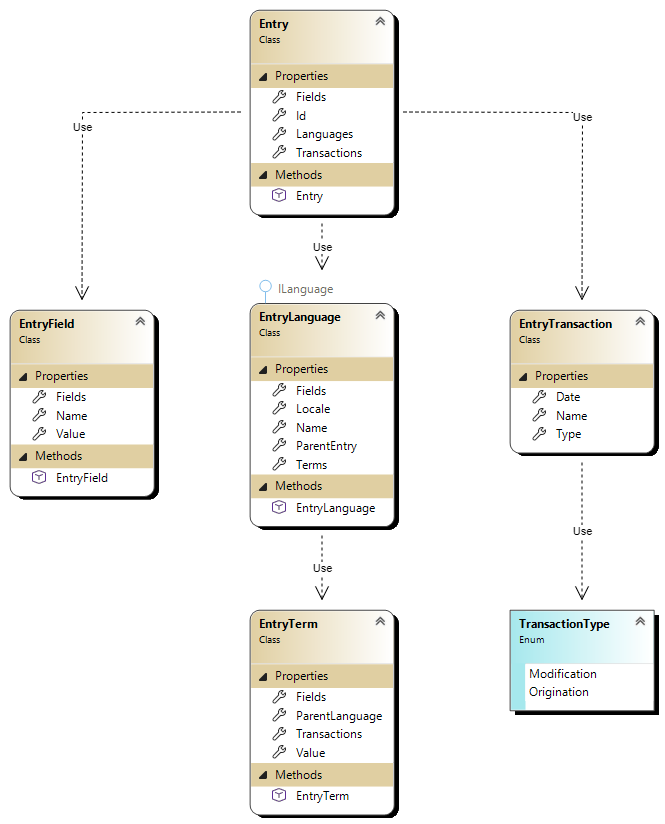
A termbase entry contains one or more terms in one or more languages together with metadata such as fields and transactions. Each term belongs to a specific language.
An Entry object contains these properties:
- Id: The unique identifier of the entry. This property is optional when you add a new entry because the termbase generates the ID. You must set it when you update an existing entry.
- Fields: A list of EntryField objects that define the entry fields.
- Languages: A list of EntryLanguage objects that define the entry languages.
- Transactions: A list of EntryTransaction objects that record the entry transactions.
Add an entry
After you get the termbase instance, call the AddEntry() method to add a new term entry. The method takes an Entry object and returns the ID of the new entry.
The language locales must match the termbase definition. In this example, the termbase uses English (en) and German (de), so the entry uses those locales.
This example creates an Entry with one field, the English term "Photo printer", the German equivalent "Fotodrucker", and an origination transaction. It then adds the entry to the file-based termbase.
var entry = new Entry
{
    Fields = new List<EntryField>
    {
        new EntryField { Name = "domain", Value = "general" }
    },
    Languages = new List<EntryLanguage>
    {
        new EntryLanguage
        {
            Locale = "en",
            Name = "English",
            Terms = new List<EntryTerm> { new EntryTerm { Value = "Photo printer" } }
        },
        new EntryLanguage
        {
            Locale = "de",
            Name = "German",
            Terms = new List<EntryTerm> { new EntryTerm { Value = "Fotodrucker" } }
        }
    },
    Transactions = new List<EntryTransaction>
    {
        new EntryTransaction
        {
            Date = DateTime.Now,
            Type = TransactionType.Origination,
            Name = "Creating Entry"
        }
    }
};

int entryId = termbase.AddEntry(entry);
Update an entry
To update an existing term entry, call the UpdateEntry() method and pass an Entry object.
Set the Id property to the ID of the entry that you want to update.
This example updates the entry created earlier. It uses the existing Id, replaces the language content, and adds a modification transaction. The updated entry contains the same German term as the previous example and two English terms, "Photo printer" and "Photo-printer", with different "Status" field values.
var entryToUpdate = new Entry
{
    Id = entryId,
    Languages = new List<EntryLanguage>
    {
        new EntryLanguage
        {
            Locale = "en",
            Name = "English",
            Terms = new List<EntryTerm>
            {
                new EntryTerm
                {
                    Value = "Photo printer",
                    Fields = new List<EntryField>
                    {
                        new EntryField { Name = "Status", Value = "Preferred" }
                    }
                },
                new EntryTerm
                {
                    Value = "Photo-printer",
                    Fields = new List<EntryField>
                    {
                        new EntryField { Name = "Status", Value = "Forbidden" }
                    }
                }
            }
        },
        new EntryLanguage
        {
            Locale = "de",
            Name = "German",
            Terms = new List<EntryTerm> { new EntryTerm { Value = "Fotodrucker" } }
        }
    },
    Transactions = new List<EntryTransaction>
    {
        new EntryTransaction
        {
            Date = DateTime.Now,
            Type = TransactionType.Modification,
            Name = "Modifying Entry"
        }
    }
};

termbase.UpdateEntry(entryToUpdate);
Retrieve all entry IDs
Call the GetEntriesIDs() method to retrieve the IDs of all entries in a file-based termbase. The method returns a list of integers, where each integer identifies an entry.
This example retrieves all entry IDs and checks whether the termbase returned any values before it processes them.
int[] entryIds = termbase.GetEntriesIDs();

if (entryIds == null || entryIds.Length == 0)
{
    // no entries
}
else
{
    // process entry IDs
}
Retrieve a fixed number of entries
Call the GetEntries() method to retrieve a fixed number of entries from a file-based termbase. The method returns a list of Entry objects.
This example retrieves entries in batches of 25. It starts at the first entry, continues until it reaches a limit of 100 entries, and stops early when no more entries are available.
int start = 0;
int end = 100;
int batchSize = 25;

for (int offset = start; offset < end; offset += batchSize)
{
    var entries = termbase.GetEntries(offset, batchSize);

    if (entries == null || entries.Count == 0)
    {
        break;
    }

    // process entries
}