Termbase templates
Creating a termbase template
A termbase template can be created by making a POST request to the /termbase-templates endpoint.
Note
If the location is not specified, the template will be created in the root folder.
Note
When dataType is picklist, the pickListValues array must be filled in or the allowCustomValues must be set to true.
Postman example:
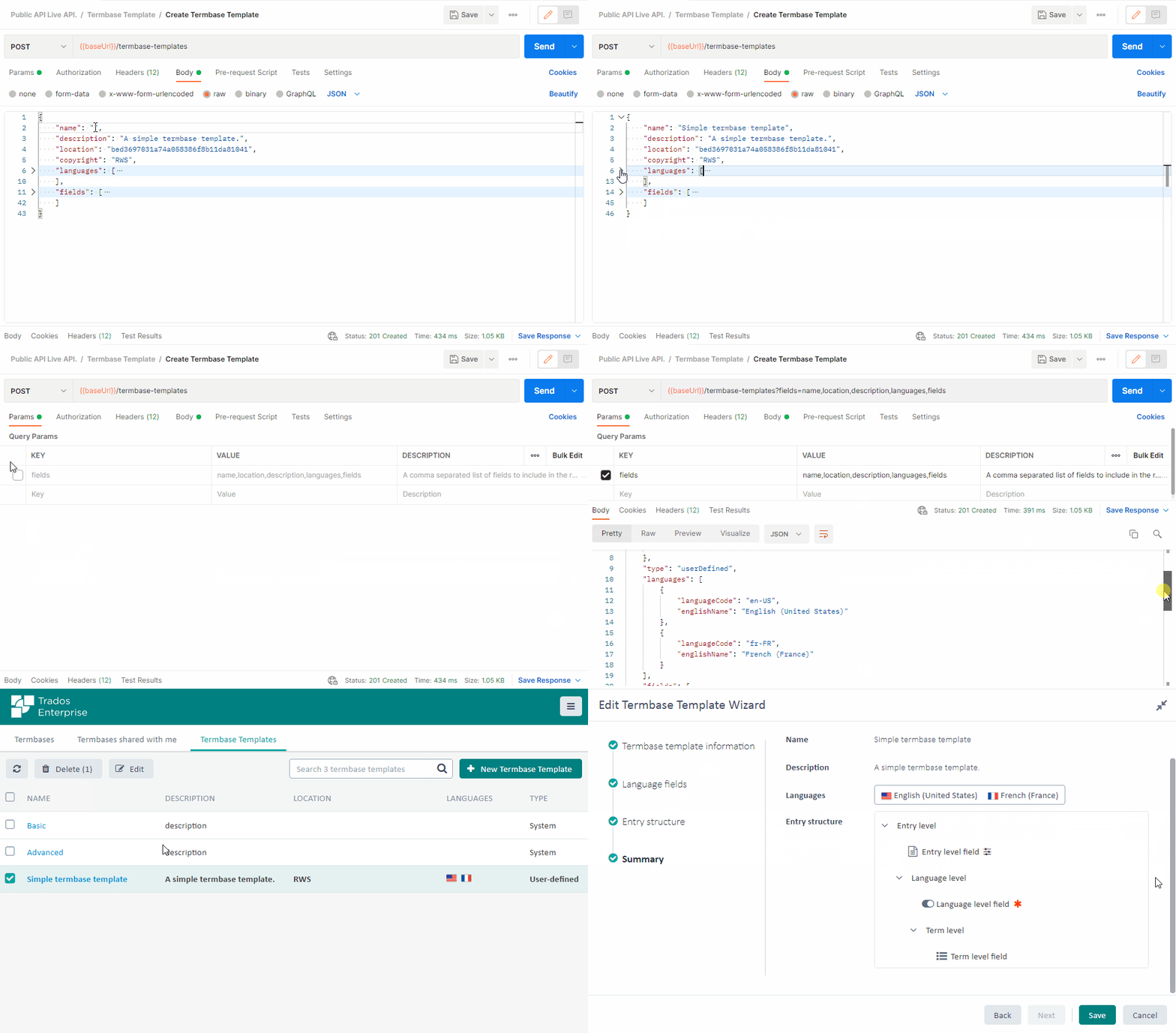
Request example: POST /termbase-templates
{
    "name": "Simple Termbase template",
    "description": "A simple termbase template.",
    "location": "5ebcd778b3d9411141eeff7a",
    "copyright": "RWS",
    "languages": [{
            "languageCode": "en-US"
        }
    ],
    "fields": [{
            "name": "Entry level field",
            "description": "A simple entry level field description.",
            "level": "entry",
            "dataType": "text",
            "allowMultiple": true,
            "isMandatory": false
        }, {
            "name": "Language level field",
            "description": "A simple language level field description.",
            "level": "language",
            "dataType": "boolean",
            "allowMultiple": false,
            "isMandatory": true
        }, {
            "name": "Term level field",
            "description": "A simple term level field description.",
            "level": "term",
            "dataType": "picklist",
            "pickListValues": [
                "Option 1",
                "Option 2",
                "Option 3"
            ],
            "allowCustomValues": false,
            "allowMultiple": false,
            "isMandatory": false
        }
    ]
}
Response example:
{
    "id": "6156bbc7a638696c7686db7f",
    "name": "Simple Termbase template",
    "location": {
        "id": "5ebcd778b3d9411141eeff7a",
        "name": "RWS"
    },
    "type": "userDefined"
}
Updating a termbase template
A termbase template can be updated by making a PUT request to the /termbase-templates/{termbaseTemplateId} endpoint. Postman example:
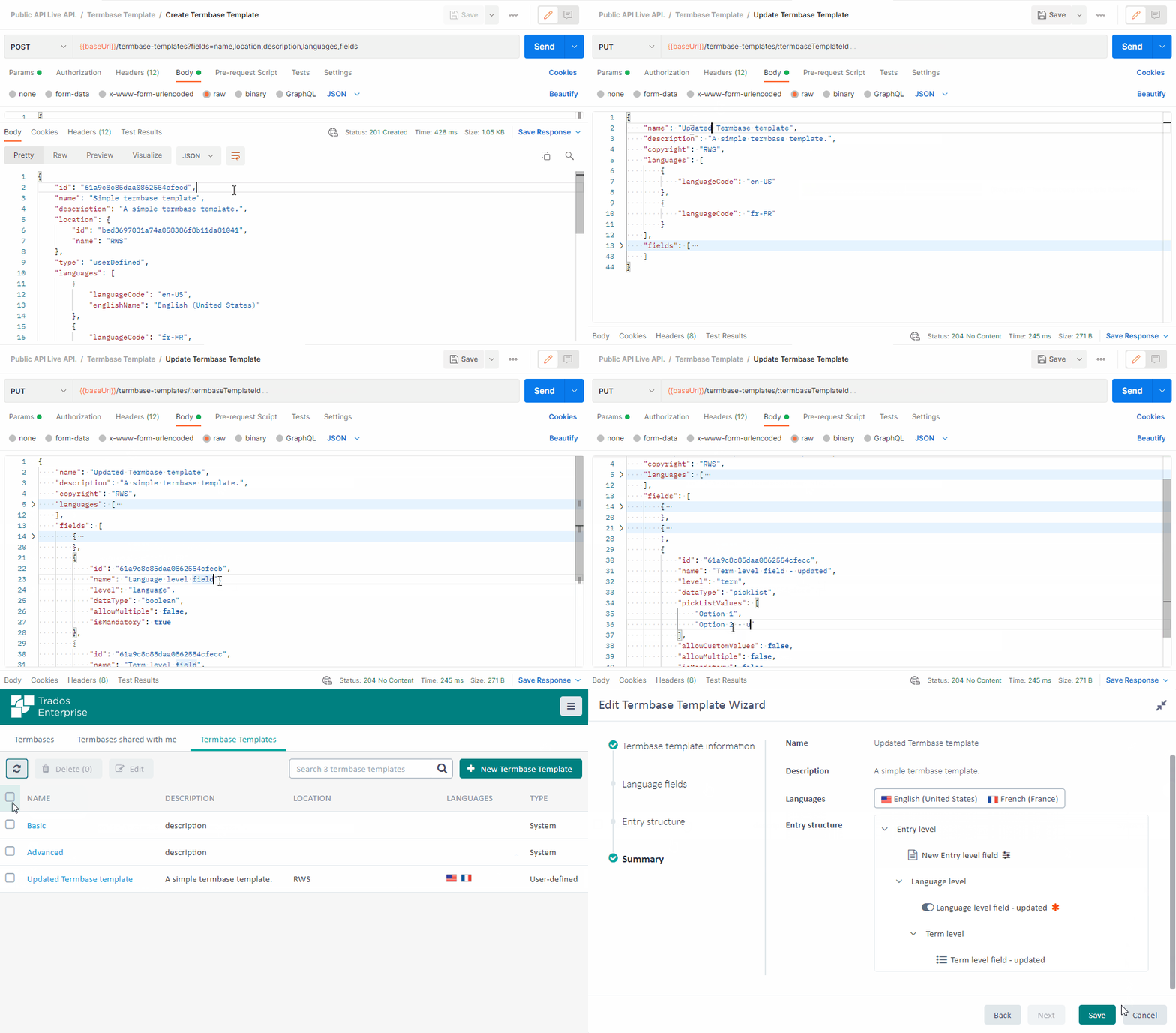
Request example: PUT /termbase-templates/6156bbc7a638696c7686db7f
{
    "name": "[UPDATED] Simple Termbase template",
    "description": "A simple termbase template.",
    "copyright": "RWS",
    "languages": [{
            "languageCode": "en-US"
        }
    ],
    "fields": [{
            "name": "[UPDATED] Entry level field",
            "description": "A simple entry level field description.",
            "level": "entry",
            "dataType": "double",
            "allowMultiple": true,
            "isMandatory": false
        }
    ]
}
Retrieving a termbase template
A termbase template can be retrieved by making a GET request to the /termbase-templates/{termbaseTemplateId} endpoint.
Request example: GET /termbase-templates/6156bbc7a638696c7686db7f?fields=name,location,description,languages,fields
Response example:
{
    "id": "615ae37ac736b8373d19a717",
    "name": "[UPDATED] Simple Termbase template",
    "description": "A simple termbase template.",
    "location": {
        "id": "5ebcd778b3d9411141eeff7a",
        "name": "RWS"
    },
    "type": "userDefined",
    "languages": [{
            "languageCode": "en-US",
            "englishName": "English (United States)"
        }
    ],
    "fields": [{
            "id": "615af63ca638696c7687d7fa",
            "name": "[UPDATED] Entry level field",
            "type": "userDefined",
            "level": "entry",
            "dataType": "double"
        }
    ]
}
Retrieving termbase templates
You can retrieve the list of termbase templates by making a GET request to the /termbase-templates endpoint.
Request example: GET /termbase-templates?fields=name,description
Response example:
{
    "items": [{
            "id": "541823689b976a6a9de11dfe",
            "name": "Basic",
            "description": "description",
            "type": "system"
        }, {
            "id": "541823689b976a6a9de11dff",
            "name": "Advanced",
            "description": "description",
            "type": "system"
        }, {
            "id": "615ae37ac736b8373d19a717",
            "name": "[UPDATED] Simple Termbase template",
            "description": "A simple termbase template.",
            "type": "userDefined"
        }
    ],
    "itemCount": 3
}
Deleting termbase templates
A termbase template can be deleted by making a DELETE request to the /termbase-templates/{termbaseTemplateId} endpoint.
Note
You can only delete the userDefined termbases.
Request example: DELETE /termbase-templates/6156bbc7a638696c7686db7f