Export quote report
The export quote mechanism has been updated and
it is now composed of three relevant endpoints.
The old export quote endpoint is deprecated, you can read about it in this section What's new.
The next endpoints would need to be executed in this specific order:
To trigger a quote report generation for a given project, make a
POSTrequest to the/projects/{projectId}/quote-report/exportendpoint. If successful, the response will contain an "Accepted" status, and you can proceed to the next step.To verify the status of the quote report generation, make a
GETrequest to the/projects/{projectId}/quote-report/exportendpoint. As soon as the response body contains a "completed" status, then you can proceed to the next step.To download the generated project quote, make a
GETrequest to the/projects/{projectId}/quote-report/downloadendpoint.
Report format
There are two available file formats for exporting the quote:
- Excel
By default, the quote report is exported as a PDF file. The format of the file can be changed by specifying the format query parameter.
Report language
The report can be localized in one of the following languages, by specifying the languageId query parameter:
- English -
en - German -
de - French -
fr - French (Canada) -
fr-CA - Japanese -
ja - Spanish -
es - Simplified Chinese -
zh-CN - Dutch -
nl - Italian -
it
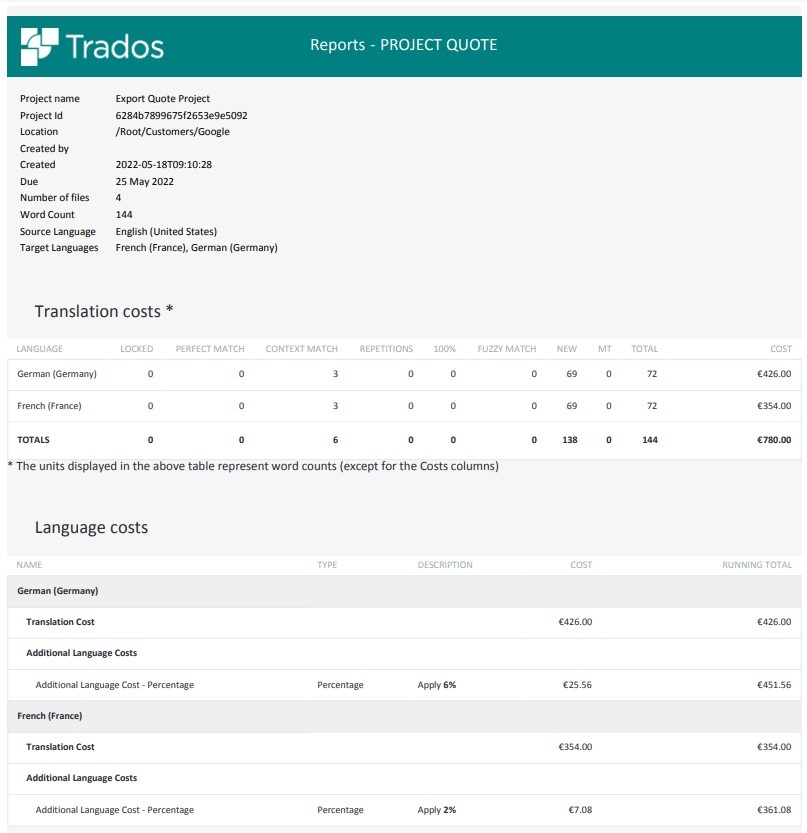
The next screenshot illustrates a sample of an exported PDF quote.
Update project quote
To update a quote, make a PUT request to the /projects/{projectId} endpoint, and specify the quote field.
Cost types
Two types of translation costs can be updated using the Trados Cloud Platform API:
- Language Costs - Costs that are applied at language level: volume, percentage, hourly, per page, conditional
- Project Costs - Costs that are applied at project level as additional cost: volume, percentage, hourly, per page, conditional, per file, per target language
Cost types available at project and language level
Note
Both language costs and project costs have identical request/response bodies, but for languageCosts, the targetLanguage field is required.
The examples below use the following translation costs:
...
{
    "translationCosts": [{
            "total": 85.4,
            "targetLanguage": {
                "languageCode": "fr-FR",
                "englishName": "French (France)"
            },
            "new": {
                "count": 854.0,
                "rate": 0.1,
                "total": 85.4,
                "runningTotal": 85.4
            }
        }
    ]
}
...
Volume
This is a fixed per word/character cost.
Request:
...
{
    "name": "Volume Cost",
    "costOrder": 0,
    "cost": 0.5,
    "volumeUnitType": "Words",
    "costType": "volume"
	...
}
...
The total cost is calculated as number of words/characters * cost of a unit:
total = count * cost
Response:
...
{
    "name": "Volume Cost",
    "count": 854.0,
    "total": 427.0,
    "cost": 0.5,
    "costType": "volume",
    "volumeUnitType": "words",
    "costOrder": 0,
    "runningTotal": 512.4
	...
}
...
The running total up until this point is equal to total cost of the current additional cost + translation costs.
Using the data above, we can get the following running total:
85.4 + 427 = 512.4
Percentage
This is a percentage cost calculated against the current cost (current language-level cost or current project-level cost).
Request:
...
{
	"name": "Percentage Cost",
	"costOrder": 1,
	"count": -10,
	"costType": "percentage"
	...
}
...
The total cost of the current additional cost is calculated using the value from the count field as a percentage from the previous running total.
total = count% * previousRunningTotal
Response:
...
{
	"name": "Percentage Cost",
	"count": -10.0,
	"total": -51.24,
	"cost": 0.0,
	"costType": "percentage",
	"costOrder": 1,
	"runningTotal": 461.16
	...
}
...
Since the previous running total is 512.4, the total cost of the current additional cost is calculated as follows:
total = -10% * 512.4 = -51.24
As a result, the new running total becomes:
runningTotal = 512.4 - 51.24 = 461.16
Hourly
This is a fixed cost per hour.
Request:
...
{
	"name": "Hourly Cost",
	"costOrder": 2,
	"count": 5,
	"cost": 1.5,
	"costType": "hourly"
	...
}
...
The total cost is calculated as number of hours * cost of an hour:
total = count * cost
Response:
...
{
	"name": "Hourly Cost",
	"count": 5.0,
	"total": 7.5,
	"cost": 1.5,
	"costType": "hourly",
	"costOrder": 2,
	"runningTotal": 468.66
	...
}
...
total = 5 * 1.5 = 7.5
runningTotal = 461.16 + 7.5 = 468.66
Per Page
This is a fixed cost per page.
Request:
...
{
	"name": "Per Page Cost",
	"costOrder": 3,
	"count": 10,
	"cost": 0.2,
	"costType": "perPage"
	...
}
...
The total cost is calculated as number of pages * cost of a page:
total = count * cost
Response:
...
{
	"name": "Per Page Cost",
	"count": 10.0,
	"total": 2.0,
	"cost": 0.2,
	"costType": "perPage",
	"costOrder": 3,
	"runningTotal": 470.66
	...
}
...
total = 10 * 0.2 = 2
runningTotal = 468.66 + 2 = 470.66
Conditional
This is a cost that is applied conditionally, for example:
Request:
...
{
	"name": "Conditional Cost",
	"costOrder": 4,
	"conditionalCostVariable": "wordCount",
	"conditionalCostOperator": "less",
	"conditionalCostThreshold": 1000,
	"cost": 100,
	"conditionalCostType": "relative",
	"costType": "conditional"
	...
}
...
If [conditionalCostVariable] [conditionalCostOperator] [conditionalCostThreshold], then add/set [cost] [conditionalCostType].
This formula translates to the following:
If wordCount < 1000, then add 100 relative.
Response:
...
{
	"name": "Conditional Cost",
	"count": 854.0,
	"total": 100.0,
	"cost": 100.0,
	"costType": "conditional",
	"costOrder": 4,
	"conditionalCostType": "relative",
	"conditionalCostOperator": "less",
	"conditionalCostVariable": "wordCount",
	"conditionalCostThreshold": 1000.0,
	"runningTotal": 570.66
	...
}
...
Since the word count (count) is 854 (in the example above), the condition becomes:
If 854 < 1000 then add 100 relative. => true
total = cost = 100
runningTotal = 470.66 + 100 = 570.66
The total cost depends on the conditionalCostType field and on whether the condition evaluates to true or false.
When the condition evaluates to false, the total will be 0, and the running total will not change.
If 854 > 1000, then add 100 relative. => false
total = cost = 0
runningTotal = 470.66
For the same values as above, and the conditionalCostType set to percentage, the total and runningTotal values will change to:
total = 100% * 470.66 = 470.66
runningTotal = 470.66 + 470.66 = 941.32
When the conditionalCostType is set to absolute, the total will be equal to the difference between the cost and the runningtotal:
total = 100 - 470.66 = -370.66
runningTotal = 100
Note
Setting conditionalCostType to absolute will cancel all the previous costs for the project or the target language.
Cost types available ONLY at project level
Per Target Language
This is an additional cost that is calculated based on the number of target languages in the project.
Request:
...
{
	"name": "Per Target Language",
	"costOrder": 5,
	"cost": 5,
	"costType": "perTargetLanguage"
}
...
The total cost is calculated as number of target languages * cost of a target language:
Response:
...
{
	"name": "Per Target Language",
	"count": 1.0,
	"total": 5.0,
	"cost": 5.0,
	"costType": "perTargetLanguage",
	"costOrder": 5,
	"runningTotal": 575.66
}
...
Since there is only one target language in the example above, the total cost becomes:
total = 1 * 5 = 5
runningTotal = 570.66 + 5 = 575.66
Per File
This is an additional cost that is calculated based on the number of files in the project.
Request:
...
{
	"name": "Per File",
	"costOrder": 6,
	"cost": 3,
	"costType": "perFile"
}
...
The total cost is calculated as number of files * cost of a file:
Response:
...
{
	"name": "Per File",
	"count": 2.0,
	"total": 6.0,
	"cost": 3.0,
	"costType": "perFile",
	"costOrder": 6,
	"runningTotal": 581.66
}
...
total = 2 * 3 = 6
runningTotal = 575.66 + 6 = 581.66
Cost order
The costOrder field defines the order in which costs are calculated.
For example, if there are two additional costs defined in the quote (see below), the percentage cost is calculated based on the running total from the volume cost.
...
{
	"name": "Volume Cost",
	"total": 427.0,
	"costType": "volume",
	"costOrder": 0,
	"runningTotal": 512.4
...
},
{
	"name": "Percentage Cost",
	"total": -51.24,
	"count": -10.0,
	"costType": "percentage",
	"costOrder": 1,
	"runningTotal": 461.16
...
}
...
When the costOrder field is switched, the total percentage cost value will be calculated based on the previous running total, which in this case is the translation cost (85.4):
...
{
	"name": "Percentage Cost",
	"count": -10.0,
	"total": -8.54,
	"costType": "percentage",
	"costOrder": 0,
	"runningTotal": 76.86
...
},
{
	"name": "Volume Cost",
	"total": 427.0,
	"costType": "volume",
	"costOrder": 1,
	"runningTotal": 503.86
...
}
...